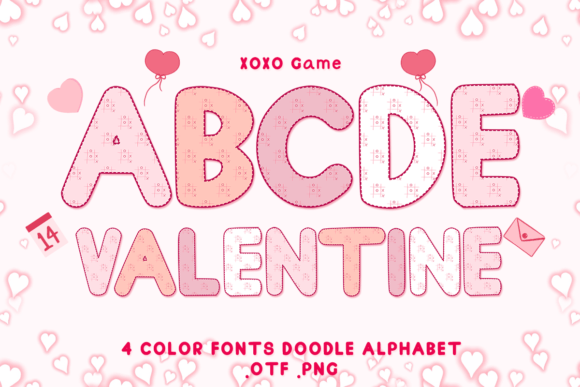
Xoxo Game: Bringing Color and Love to Your Designs with SVG Fonts
In the digital age of design, typography has evolved far beyond simple black-and-white text. It has become a canvas for emotion, storytelling, and vibrant expression. At the forefront of this colorful revolution is the Xoxo Game, a unique color font collection designed specifically to capture the essence of affection, playfulness, and celebration. Whether you are crafting a romantic Valentine’s Day card, designing a logo for a boutique brand, or creating custom merchandise, understanding how to utilize these advanced typographic tools can transform your creative output.
This article explores the world of Xoxo Game, diving deep into what makes it special, how it fits into modern design workflows, and the technical nuances required to use it effectively. From its origins as a heartfelt project to its practical application in professional software, we will guide you through everything you need to know to make the most of this adorable typeface.
The Heart Behind the Design: Purpose and Inspiration
The Xoxo Game was not created merely as another asset in a vast library of fonts; it was born from a desire to share joy and creativity with the world. As the creators proudly present, this is a design "intended from my heart for you to enjoy every design." This sentiment is woven into every curve and color gradient of the letters. In a market often saturated with generic templates, Xoxo Game stands out by offering a genuine emotional connection through its aesthetic.
The primary purpose of this font is to inject personality into text that would otherwise feel flat. Traditional fonts convey information, but color fonts like Xoxo Game convey feeling. The "Xoxo" motif—universally recognized as a symbol for hugs and kisses—makes it an ideal choice for Valentine’s Day projects. However, its utility extends far beyond February 14th. The playful nature of the design makes it suitable for weddings, baby showers, friendship celebrations, and even casual business branding that wants to appear approachable and warm.
Why Color Matters in Typography
To understand the value of Xoxo Game, one must first appreciate the shift toward OpenType-SVG technology. Standard fonts (like TTF or OTF) render text in a single color, usually determined by the user's software settings. In contrast, OpenType-SVG fonts contain vector graphics within each character, allowing for multiple colors, gradients, and textures directly embedded in the letterform.
This technology allows designers to:
- Maintain Scalability: Unlike raster images, SVG fonts remain crisp at any size, from a tiny social media icon to a massive billboard.
- Save Time: There is no need to manually apply gradients or shadows to individual letters. The effect is built-in.
- Enhance Readability: Strategic use of color can improve visual hierarchy and draw the eye to key messages.
Technical Compatibility: Where Does Xoxo Game Work?
One of the most critical aspects of using specialized fonts like Xoxo Game is understanding their compatibility. Because this product relies on OpenType-SVG technology, it requires software capable of rendering complex vector data within text layers. This distinction is vital for avoiding frustration during the design process.
Supported Software Ecosystems
The Xoxo Game font is fully compatible with a robust suite of industry-standard applications. If you are working in the following environments, you can expect seamless integration:
- Adobe Photoshop: Ideal for web graphics, social media posts, and photo manipulation where text needs to blend with imagery.
- Adobe Illustrator: Perfect for vector-based logo design, print layouts, and scalable artwork.
- Silhouette Studio: A favorite among crafters, Silhouette supports SVG fonts, allowing users to cut colored designs on vinyl or heat transfer material.
- Inkscape: An excellent open-source alternative for those who prefer free software without sacrificing functionality.
When installed correctly, these programs recognize the embedded color data, displaying the full vibrancy of the Xoxo Game design immediately upon selection.
The Cricut Limitation: A Crucial Distinction
While Xoxo Game is powerful, there is a common misunderstanding regarding its use with Cricut machines. It is important to note clearly: The OTF and/or TTF files of this product are not compatible with Cricut.
Cricut Design Space, the proprietary software used with Cricut cutting machines, has historically had limited support for true multi-color OpenType-SVG fonts. While recent updates have improved some capabilities, standard OTF/TTF versions of color fonts often fail to render the embedded colors correctly, appearing instead as solid black outlines or failing to load entirely. To avoid wasted materials and time, users intending to use Cricut should consult our Ultimate Font Guide for specific workarounds or consider using the font in a supported vector program like Illustrator or Inkscape before importing the final graphic as an image.
Practical Applications in Modern Life and Business
The versatility of Xoxo Game means it is not just a hobbyist tool; it is a viable asset for professionals across various sectors. Here is how different groups can leverage this font:
For the Creative Entrepreneur
If you run a small business selling greeting cards, stickers, or apparel, Xoxo Game offers a competitive edge. Instead of spending hours creating custom illustrations for headlines, you can use this font to instantly elevate your product mockups. For example, a "Happy Valentine's" banner created with Xoxo Game looks professionally finished without requiring advanced illustration skills. The limitless options allow you to create seasonal collections quickly, adapting the same core font for different holidays by simply changing the context of the message.
For Educators and Event Planners
In education, engagement is key. Teachers can use Xoxo Game to create colorful worksheets, classroom decorations, or presentation slides that capture students' attention. Similarly, event planners can use the font for invitations, signage, and digital invites. The "adorable" nature of the font sets a welcoming tone, making guests feel anticipated and valued before they even arrive.
For Personal Projects and DIY Enthusiasts
Perhaps the most rewarding use of Xoxo Game is for personal expression. Whether you are designing a scrapbook page, creating a custom gift tag, or decorating a home office, the ability to use a high-quality color font empowers you to produce results that rival professional studios. The design is intended for everyone to enjoy, removing the barrier between "amateur" and "expert."
Common Misunderstandings and Best Practices
As with any new technology, there are misconceptions that can hinder the user experience. Let's clarify a few points to ensure you get the best results.
- "I can change the colors easily." (Clarification): While some software allows for recoloring SVG fonts, others do not. The beauty of Xoxo Game lies in its pre-designed palette. If you need a specific corporate color scheme, you may need to trace the font or use a vector editor to modify the internal paths.
- "It works everywhere." (Clarification): As mentioned, browser support and mobile app support for SVG fonts vary. Always test your file on the final device or platform before publishing.
- "I don't need to install anything." (Clarification): You must install the .otf or .ttf file onto your operating system (Windows or macOS) before it appears in your design software's font menu.
Building a Broader Understanding of Digital Typography
Using a font like Xoxo Game is more than just picking a pretty style; it is about embracing the evolution of digital communication. We are moving away from rigid, monochromatic text toward dynamic, expressive visuals that speak directly to our emotions. This shift reflects a broader trend in technology where user interfaces and content are becoming more immersive and personalized.
By mastering tools like OpenType-SVG, you position yourself at the forefront of this trend. You gain the ability to communicate complex feelings—love, excitement, warmth—with a single word. The "limitless options" promised by the Xoxo Game creators are real, provided you understand the technical landscape and choose the right tools for the job.
Getting Started: Your Next Steps
Ready to give good fonts to everyone? Start by downloading the Xoxo Game package and installing it on your computer. Open your preferred software—whether that be Photoshop for a flyer or Illustrator for a logo—and select the font. Experiment with different sizes and pairings. Remember, if you encounter issues with specific cutting machines or older software versions, refer back to the Ultimate Font Guide for detailed troubleshooting steps.
Design is a journey of discovery, and Xoxo Game is a wonderful companion on that path. With its heartfelt origin and technical prowess, it offers a perfect blend of art and function. So go ahead, let your creativity flow, and bring a splash of color to your next project. After all, the best designs are those that come from the heart, just like this one.