Forging Your Interface: A Comprehensive Guide to Iron Steel Game UI Assets
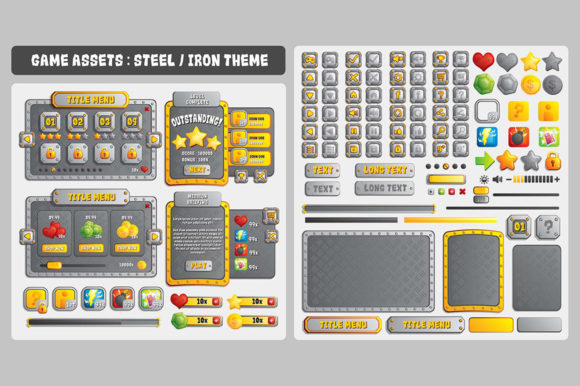
In the competitive landscape of mobile gaming, the user interface (UI) is often the first thing a player interacts with. It serves as the bridge between the player's intent and the game's mechanics. For developers targeting Android or iOS platforms, creating a cohesive, high-quality visual style can be both time-consuming and technically challenging. This is where specialized asset packs like the Iron Steel Game UI Assets become invaluable tools. Designed specifically for game designers and developers, this collection offers a robust foundation for building immersive, industrial-themed interfaces that stand out in app stores.
Whether you are an indie developer working on your first title or a seasoned studio looking to streamline production, understanding how to leverage these vector-based assets can significantly enhance your workflow. This article explores the technical specifications, practical applications, and creative potential of the Iron Steel Game UI kit, providing a clear roadmap for integrating it into your next project.
The Foundation of Professional Game Design
Before diving into the specifics of the file formats, it is essential to understand why high-quality UI assets matter. In modern game design, the interface is not merely a menu; it is part of the narrative. An "Iron Steel" aesthetic suggests durability, strength, and a futuristic or industrial setting—themes that are incredibly popular in strategy, action, and role-playing games. Using pre-made assets allows developers to maintain consistency across buttons, panels, icons, and backgrounds without starting from scratch.
For mobile platforms, where screen real estate is limited and user attention spans are short, clarity and visual impact are paramount. A well-designed UI guides the player intuitively, reducing friction and increasing engagement. The Iron Steel Game UI Assets are crafted to meet these demands, offering a polished look that feels native to the device while retaining a unique artistic identity.
Why Vector Graphics Are the Industry Standard
One of the most critical features of this asset pack is its creation using Adobe Illustrator. Unlike raster images (such as JPEGs or standard PNGs), which are made of pixels and lose quality when enlarged, vector graphics are based on mathematical formulas. This distinction is crucial for game development, particularly in the mobile sector.
Scalability is the primary advantage. Because the Iron Steel assets are vectors, they are infinitely resizable. You can shrink a button icon for a compact HUD (Heads-Up Display) or expand a background panel for a full-screen menu without any loss of sharpness or clarity. This flexibility ensures that your game looks crisp on everything from small smartphones to large tablets, accommodating the diverse range of resolutions found in the Android and iOS ecosystems.
Furthermore, being editable means you are not locked into a single color palette or shape. If your game requires a specific shade of metallic blue or a modified border radius, you can open the source files and adjust them instantly. This level of customization empowers designers to tailor the assets to their specific brand identity, ensuring the final product feels unique rather than generic.
Understanding the Package Contents
To maximize the utility of the Iron Steel Game UI Assets, it is important to familiarize yourself with the included file formats. Each file type serves a distinct purpose in the development pipeline, catering to different stages of production and deployment.
- EPS File: Encapsulated PostScript (EPS) is a universal vector format compatible with a wide range of graphic design software beyond just Adobe products. This ensures that if you switch tools or collaborate with external artists, the integrity of the vector data remains intact.
- Ai File: The native Adobe Illustrator file provides the highest level of editability. This is where layers, groups, and effects are preserved exactly as the creator intended. For professional workflows, this is the master file you will use for all modifications.
- Transparent PNG File: While vectors are great for editing, game engines like Unity or Unreal Engine often require rasterized images for rendering. The included PNG files come with transparent backgrounds, ready to be dropped directly into your game engine. These are optimized for immediate use, saving you the time of exporting and slicing manually.
- Read Me File: Documentation is often overlooked but is vital for a smooth experience. The Read Me file contains instructions, licensing details, and tips on how to best utilize the assets within your project structure.
This comprehensive suite of files ensures that whether you need to tweak a design element or simply import a finished texture, you have the right tool at your disposal.
Resolution and Adaptation Strategies
A common question among developers is how these assets fit into various screen sizes. The Iron Steel Game UI Assets are built using a reference resolution of 1920x1200. This is a standard high-definition desktop resolution that serves as an excellent baseline for high-fidelity mobile displays. However, mobile devices vary wildly in aspect ratio and pixel density.
Adapting to Different Resolutions
While the 1920x1200 reference provides a solid starting point, you may need to adjust dimensions to fit specific mobile requirements. Because the core assets are vector-based, resizing is straightforward. You can extend or shrink the image dimension via your preferred image editor without worrying about pixelation. However, there are nuances to consider:
- Manual Rendering: If you are working with complex effects or gradients that might behave differently when scaled down, it is often better to manually render the assets at the target resolution. This gives you precise control over how textures appear on smaller screens.
- Aspect Ratio Considerations: Mobile screens are often taller than they are wide (portrait mode) or have varying bezel sizes. When adapting the 1920x1200 layout, ensure that critical UI elements remain within the "safe zone" of the screen to avoid being obscured by system navigation bars or notch areas on modern phones.
- Performance Optimization: While vectors are scalable, the final output in your game engine should be optimized for performance. Large, high-resolution PNGs can consume significant memory. Use the vector files to create multiple versions of your assets tailored to low, medium, and high-density screens (often referred to as @1x, @2x, and @3x in iOS development).
By understanding the relationship between the reference resolution and your target device, you can ensure that your game runs smoothly and looks professional on every platform.
Common Misconceptions About Asset Packs
There is a prevailing assumption that using pre-made assets results in a "cookie-cutter" game that lacks originality. This is a misunderstanding of how professional development works. Asset packs like the Iron Steel UI kit provide a foundation, not a finished product. The true artistry lies in how you combine, modify, and integrate these elements.
For example, two developers using the same Iron Steel button set can create vastly different experiences. One might pair it with dark, gritty textures for a cyberpunk thriller, while another might add glowing neon overlays for a sci-fi racer. The vector nature of the files encourages experimentation. You can change stroke weights, alter fill colors, or even merge shapes to create entirely new components. The assets are meant to accelerate your workflow, allowing you to focus more on gameplay mechanics and storytelling rather than spending weeks drawing basic buttons.
Integrating Assets into Modern Workflows
In the fast-paced world of mobile game development, efficiency is key. The Iron Steel Game UI Assets fit seamlessly into modern agile workflows. By having a consistent library of UI elements, teams can prototype faster. Designers can quickly mock up menus, while programmers can implement functional UI logic sooner because the visual assets are already prepared.
Moreover, the versatility of these assets extends beyond just mobile games. They can be adapted for web-based games, augmented reality (AR) interfaces, or even marketing materials for your game launch. The high-quality vector nature ensures that your branding remains consistent across all touchpoints, from the App Store listing to the in-game experience.
For beginners, this package lowers the barrier to entry. It removes the intimidation of creating complex industrial designs from scratch, allowing new developers to learn the principles of UI composition by deconstructing and rebuilding the provided elements. For experienced professionals, it acts as a force multiplier, freeing up valuable time to tackle more complex challenges like physics simulation or AI behavior.
Conclusion: Building Stronger Games
The journey of creating a successful mobile game involves countless decisions, but few are as impactful as the choice of your visual language. The Iron Steel Game UI Assets offer a powerful solution for developers aiming to deliver a premium, industrial-themed experience on Android and iOS. With their vector-based architecture, comprehensive file formats, and flexible resolution handling, they provide the perfect balance between ease of use and creative freedom.
By leveraging these tools, you are not just importing images; you are adopting a workflow that prioritizes quality, scalability, and efficiency. Whether you are adjusting dimensions for a new tablet release or tweaking a color scheme to match a seasonal event, the adaptability of these assets ensures your game remains relevant and visually stunning. As you embark on your next project, remember that the right tools can transform a good idea into a great game. Let the Iron Steel UI kit be the forge where your vision takes shape.