Leaf Nature Game UI Assets: A Workflow Guide for Mobile Developers
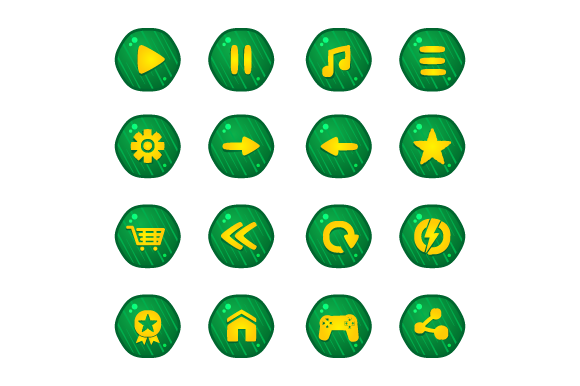
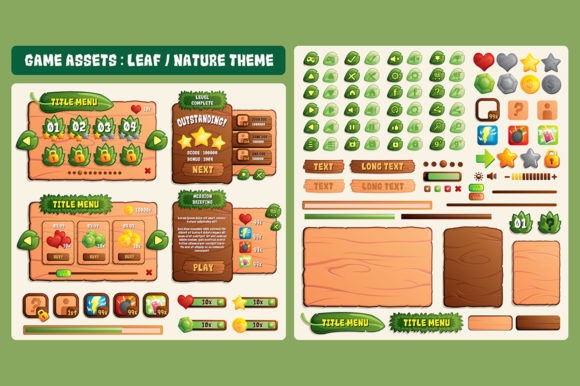
In the competitive landscape of mobile game development, the user interface (UI) serves as the primary bridge between the player and the game mechanics. For developers targeting Android or iOS platforms, the visual language must be intuitive, responsive, and aesthetically pleasing to retain user engagement. The Leaf Nature Game UI Assets package offers a specialized solution for creators seeking an organic, eco-friendly aesthetic without the time investment required to design every element from scratch. This resource is not merely a collection of images; it is a foundational toolkit designed to integrate seamlessly into professional workflows, supporting everything from initial prototyping to final asset optimization.
Understanding the Asset Structure and File Formats
The effectiveness of any digital asset library depends heavily on its technical structure and compatibility with industry-standard software. The Leaf Nature Game UI Assets are crafted using Adobe Illustrator, ensuring that every button, icon, background, and decorative element exists as a scalable vector graphic. This origin point is critical for developers who require flexibility across various screen densities and device sizes common in the modern mobile ecosystem.
The package includes four distinct file types, each serving a specific function within the production pipeline:
- EPS Files: Encapsulated PostScript files provide a universal standard for vector data, ensuring compatibility with a wide range of design and publishing applications beyond just the Adobe suite.
- Ai Files: Native Adobe Illustrator files allow designers to access the full hierarchy of layers, groups, and editable paths. This is essential for customizing colors, shapes, and compositions to match a specific brand identity.
- Transparent PNG Files: These rasterized versions offer immediate usability for rapid prototyping or for engines that prefer bitmap imports. The transparency ensures clean integration over dynamic backgrounds.
- Read Me File: Documentation is often overlooked but vital. This file provides necessary context regarding licensing, layer organization, and usage instructions, streamlining the onboarding process for new team members.
By providing both vector and raster formats, this kit accommodates different stages of development. Early-stage concepting might rely on the quick deployment of PNGs, while the final polish phase benefits from the infinite scalability of the AI and EPS vectors.
Integrating Assets into the Design Workflow
Implementing the Leaf Nature Game UI Assets requires a strategic approach to ensure consistency and efficiency. The workflow begins before the assets even touch the game engine. During the pre-production phase, designers can utilize the vector files to create high-fidelity mockups. Because the assets are built on a 1920x1200 resolution reference, they serve as an excellent baseline for establishing layout grids and spacing rules.
When moving into the active development phase, the interaction between these assets and game engines like Unity or Godot becomes paramount. While the PNG files are ready for import, the true power lies in the ability to modify the source vectors. If a game mechanic changes—for instance, requiring a larger "Start" button or a differently shaped inventory icon—the designer can open the Ai file, adjust the dimensions or curvature, and re-export the asset instantly. This eliminates the need to redraw elements, saving significant man-hours during iterative testing.
For teams working on cross-platform projects, the vector nature of the Leaf Nature Game UI Assets is particularly advantageous. Mobile devices vary wildly in screen aspect ratios and pixel densities. A static image designed for one resolution may appear blurry on another. With vector-based assets, developers can render the UI elements at any resolution required by the target device, ensuring crisp visuals on both low-end Android phones and high-resolution iOS tablets.
Adapting Resolution and Scaling Strategies
A critical consideration when utilizing this kit is the base resolution of 1920x1200. While this resolution covers many standard tablet and desktop layouts, mobile games often require adaptation for portrait modes or ultra-wide screens. The documentation advises that users may need to adjust the size if targeting other resolutions. This adjustment should not be a simple stretch, which would distort the organic lines of the leaf motifs and ruin the aesthetic integrity.
Instead, the recommended process involves using the vector capabilities to manually render the assets again at the desired scale. In Adobe Illustrator, this means selecting the artboard, resizing it to the target dimension, and then scaling the vector objects proportionally. Alternatively, if using the PNG files for quick adjustments, an image editor should be used to extend or shrink the canvas dimension carefully, maintaining the aspect ratio of individual elements where possible. However, for the highest quality control, returning to the source Ai file is always the superior method.
This flexibility allows the assets to fit into diverse project scopes. Whether creating a simple puzzle game or a complex role-playing adventure, the UI components can be resized to fit HUDs, menus, and dialog boxes without losing clarity. This adaptability reduces the risk of visual artifacts and ensures a polished final product.
Optimizing for Performance and Consistency
Beyond aesthetics, performance is a key metric for mobile games. Large, unoptimized textures can lead to increased load times and higher memory consumption, which can negatively impact the user experience, especially on older devices. The Leaf Nature Game UI Assets facilitate performance optimization through their modular design. Since the package contains separate elements, developers can choose to export only the specific icons needed for a particular scene, rather than loading a massive sprite sheet containing unused graphics.
Consistency is another factor where these assets excel. A cohesive visual style is difficult to achieve when piecing together free resources from various sources. The Leaf Nature Game UI Assets provide a unified set of styles, color palettes, and line weights. By adhering to this single design language, developers ensure that the game feels like a coherent whole rather than a patchwork of disparate parts. This consistency extends to the user experience, as players intuitively understand how to interact with buttons and menus that share a common visual DNA.
Practical Implementation Tips for Teams
To maximize the value of this resource, teams should establish clear protocols for asset management. When integrating the Leaf Nature Game UI Assets, it is advisable to create a dedicated folder structure within the project directory. Separate the raw vector files from the exported PNGs to prevent version control conflicts. Label all exported files clearly with their intended use and resolution to avoid confusion among team members.
Furthermore, consider the customization potential early in the planning stage. If the game's color scheme differs significantly from the default green tones of the nature theme, use the Ai files to apply global color swatches. This allows for rapid theming; a single change in the master file can update the entire UI palette. This level of control supports agile development, where requirements may shift based on user feedback or market trends.
For freelancers and small business owners, the time saved by using a pre-built kit translates directly to cost savings and faster time-to-market. Instead of spending weeks designing a UI from scratch, a developer can spend days refining and implementing these assets, allowing more time to focus on core gameplay mechanics and bug fixing. The inclusion of the Read Me file also serves as a training tool for junior designers, helping them understand best practices for handling vector assets in a game production environment.
Long-Term Value and Project Scalability
The utility of the Leaf Nature Game UI Assets extends beyond a single project. As a reusable resource, the kit can serve as a foundation for future titles that share a similar genre or aesthetic. The vector files remain editable indefinitely, meaning that years later, a developer can return to the original source files to create updates, DLC interfaces, or promotional materials with the same quality assurance.
In the broader context of the game development lifecycle, having a reliable, high-quality asset library reduces technical debt. It minimizes the need for last-minute redesigns and ensures that the visual presentation meets professional standards. For entrepreneurs and publishers looking to invest in mobile gaming, the ability to deliver a visually consistent and performant product is a decisive factor in success. The Leaf Nature Game UI Assets provide the structural support necessary to achieve these goals efficiently.
Ultimately, the decision to use this kit is a decision to prioritize workflow efficiency and visual quality. By leveraging the editable vector format and the comprehensive file structure, developers can navigate the complexities of mobile UI design with confidence. Whether you are a solo creator or part of a large studio, integrating these assets into your process offers a practical path toward creating engaging, nature-inspired mobile experiences that resonate with players on both Android and iOS platforms.